Today’s progress: a complete mouse housing concept modeled with AI CAD.
I am building Nora3D so people can spend less time clicking through CAD commands. Naturally, today I used it to design a mouse.
The useful part is not the irony. It is the move from an outer shape to a housing with internal structure: a top shell, a bottom shell, openings, supports, and assembly details. Those are the parts that turn “make it look like a mouse” into a mechanical design you can work on.
My goal is simple: give Nora3D the references and requirements for the enclosure, let it take on more of the mechanical CAD work, and spend more of your attention on the electronics.
From a reference brief to a housing model
The recording shows an attached reference brief and the instruction:
Use the attached image as a reference for this document.
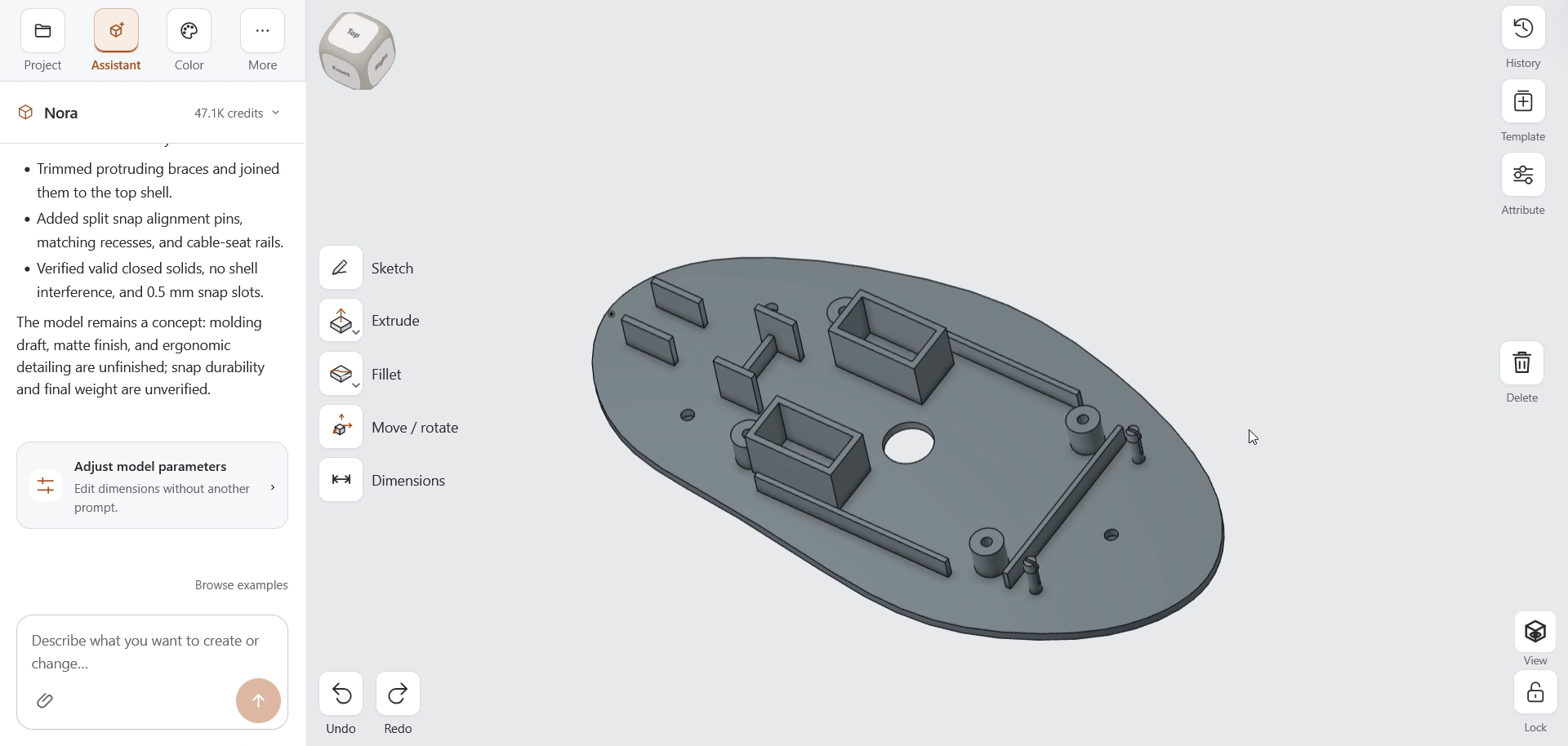
Nora builds up the model through sketches and solid features. The base outline develops into a curved housing, with openings along the top and side. Later, the view inside the bottom shell reveals supports, pockets, rails, and mounting features.
That inside view matters to me. A convincing silhouette is one milestone. Making room for the things the object needs to contain is another.
The workflow also includes corrections. Nora identifies a conflict between assumed switch pockets and screw supports and reports moving the pockets. Later, it notes that braces protrude through the outer shell and trims them before continuing with assembly features. I give follow-up instructions, including “go on,” as the design develops.
This is a sequence of modeling and refinement, not a claim that one vague sentence produces a finished device without review.
Better requirements leave less room for guessing
The main lesson from today is about what you give the AI.
A reference image can communicate appearance. Dimensions tell it how large the housing should be. Component requirements explain what needs to fit inside and where the openings or supports belong. These inputs answer different questions; one does not automatically replace the others.
For a mouse project, useful inputs might include:
- Reference views and the intended overall length, width, and height.
- The actual circuit board outline and mounting-hole locations.
- Switch, scroll-wheel, and sensor dimensions and positions.
- Cable or connector access, fastening preferences, and required clearances.
These are examples of details to supply, not a list of measurements verified in this demonstration.
The aim is not to write the longest possible prompt. It is to provide the information that would otherwise have to be guessed. Clear, consistent requirements give Nora3D a more specific target and give you a better basis for checking the result.
The switch-pocket correction in the video is a useful reminder. If an internal component is only assumed, the surrounding geometry is being designed around an assumption. Supplying its real dimensions is much more valuable than asking for something “more accurate.”
A model you can keep working on
At the end of the recording, the history panel shows named parts and features rather than only a finished image. The model can be inspected from the outside and inside, so the next conversation can be about a particular part of the housing.
That is the kind of continuity I want from AI CAD. The first result should be a place to continue designing, not the end of the process.
I also ask Nora to color the model. It chooses a deep blue top shell, charcoal bottom shell, and light gray foot pads. As in the previous AI coloring demonstration, appearance becomes another step in the same design conversation.
Focus on the electronics while Nora helps with the housing
For someone building an electronic product, the enclosure should not have to become an entirely separate career.
The division of work I am aiming for is straightforward. You bring the component choices, dimensions, and design intent. Nora helps turn those requirements into mechanical geometry. You inspect and refine the result around the hardware you actually plan to use.
This mouse is a housing concept, not a tested electronic product or a production-ready mold design. The demo’s completion note leaves molding draft, finish, and ergonomic detailing unfinished, with snap durability and final weight unverified. Physical fit and function still need to be checked with the intended components.
Even with that work ahead, today’s progress feels meaningful. Nora is handling more than the outline of an object. It is helping build the structure around what goes inside.
Focus on the electronics. Let Nora3D help with the mechanical CAD.
That is the direction I am building toward, one housing at a time.