I built AI to handle the technical work.
Apparently, my taste needed assistance too.
Today, I let Nora3D choose the colors for a bus CAD model on my tablet. No palette supplied. No instructions about which shade belonged on the roof. Just a request to give the bus different colors.
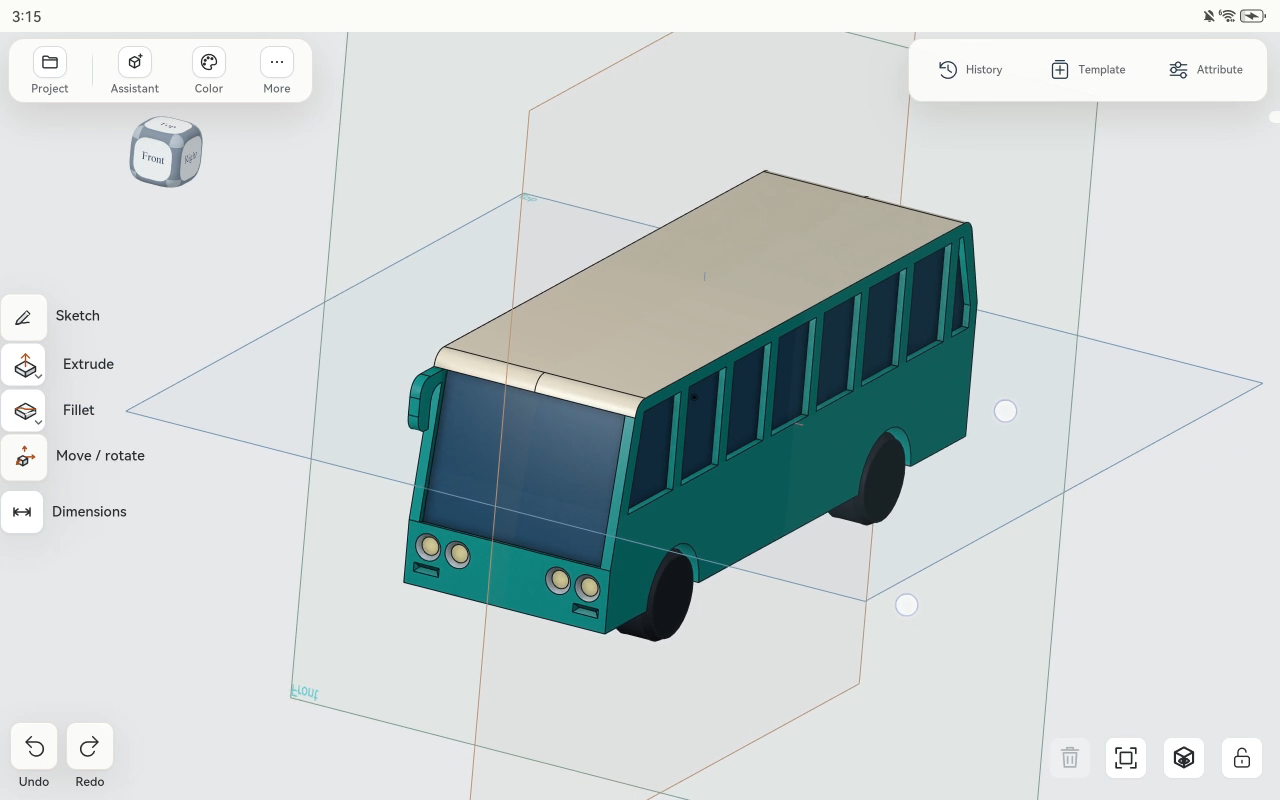
Nora turned a gray model into a teal bus with a cream roof, dark blue windows, black tires, and pale headlights.
It is a small change with a useful implication: an AI CAD assistant can help with how an object looks, as well as how it is shaped. For the multicolor 3D printing workflow I want to build toward, those decisions belong with the model.
One request for a bus full of color
The demonstration starts with an existing bus model. Its body, windows, roof, and wheels are already there, but the overall appearance is largely gray.
My prompt is:
Give the different colors to this bus.
That leaves the aesthetic choices to Nora. I am asking for a result, not assigning a color to every surface myself.
The body changes to teal first. As the work continues, Nora notes that the body color is masking the face details and adjusts the appearance so the roof and windows can show their own colors. The finished view separates the cream roof, blue glazing, dark tires, and light headlamps from the main body.
I then rotate and zoom the bus in the tablet workspace. The colors stay with the model as the view changes. This is a CAD appearance change, not a separately generated picture of what the bus might look like.
Letting AI make a first design choice
I like that I did not have to arrive with the whole answer.
A lot of design begins with a vague preference: make this easier to read, give it some character, help these parts stand apart. Here, the request is even simpler. Give it different colors.
Nora's palette gives me something concrete to judge. The light roof separates from the darker body. The windows read differently from the surrounding panels. The wheels stop looking like extensions of the bodywork.
I can decide whether I like that direction by looking at the object. Choosing a first palette does not make AI the final authority on taste. It gives the person designing a useful starting point.
In my case, it also removes my favorite excuse for leaving everything gray.
Why this matters for multicolor 3D printing
For a multicolor print, shape is only part of the intended result. Which regions should share a color matters too. The bus makes that easy to see: a cream roof and dark tires communicate a different design from one uniformly teal object.
That is why I want color decisions to live alongside the CAD geometry. The colored model provides a reference for the intended regions and palette, rather than leaving those choices entirely to a later printing step.
Model appearance is not yet a printer instruction. Taking this design into a physical multicolor print still requires carrying or recreating the color assignments in the chosen export and slicing workflow, mapping them to available materials, and checking the print setup. This demonstration shows the CAD coloring step, not a completed export, slice, or physical print.
The direction is what excites me: describe the object, develop its shape, and then ask AI to help with its appearance in the same workspace.
More of the design conversation on a tablet
In the previous hinged box demonstration, I asked Nora to add a lid that could open. In this one, the geometry already exists, and I ask it to make a visual choice.
Both start with an ordinary request about the object in front of me. I want that to become a more natural way to work on a tablet: say what needs to change, inspect the result, and keep going.
Today, the bus got a color scheme.
My contribution was asking. I am choosing to call that art direction.