Real AI CAD is here. On a phone.
CAD giants, tremble.
I’ve been doing all the trembling so far. It’s your turn.
That was my announcement. The demonstration is a little less dramatic: I draw a rough rectangle on my phone, turn it into a block, then draw a circle and cut a hole in it.
No aircraft engine. No thousand-part assembly. A block with a hole.
I’m unusually pleased with it.
The important part is where the modeling happens
The recording shows Nora3D running at app.nora3d.ai in a phone browser. I’m not opening a finished model to admire it. I’m making geometry and changing it on the same screen.
It starts with a hand-drawn outline. My rectangle has the confidence of a rectangle, if not all the qualifications. The sketch becomes a clean rectangular profile, and that profile becomes a solid block.
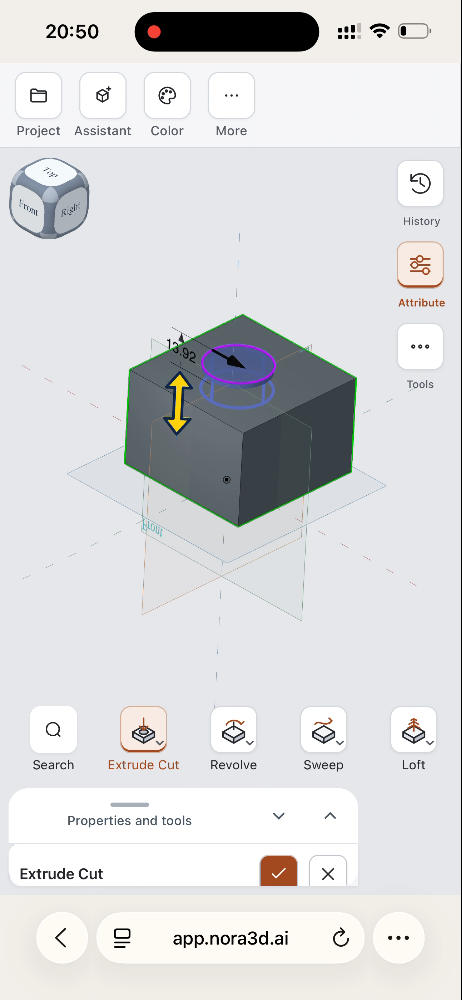
Next, I draw a rough loop on its top face. The interface offers shape suggestions, including a circle. With a circular profile in place, I open the extrusion tools, switch to Extrude Cut, and adjust the cut in the model. The result is a block with a circular opening.
The clip is an edited demonstration, not a generation-speed benchmark. What I want you to notice is the sequence: a rough gesture becomes a usable sketch, and the sketch remains part of an actual modeling workflow.
AI should help without taking the model away
When people hear “AI CAD,” they often imagine typing a sentence and waiting for a finished object.
That is one useful starting point. It should not be the only one.
Sometimes I can describe a part. Sometimes it is easier to draw the outline. Sometimes the fastest way to explain a change is to select something and move it. I want Nora3D to make those choices feel like parts of the same process, not separate products.
This particular clip is about drawing and direct modeling, not a text-to-CAD generation. That distinction matters. An AI CAD tool still needs to be a CAD tool when I want to take over.
For me, “real” means I still have work I can act on: a sketch to confirm, a face to use, an operation to choose, and a cut to adjust. The software can help interpret my rough input without deciding that my involvement is over.
A phone is a demanding place to prove the idea
There is not much room to hide a complicated interface on a phone. A panel can cover the very part I need to see. A control that feels obvious with a mouse can become awkward with a finger.
In this recording, the modeling panels can be pulled down to reveal the object while the operation remains available. That is a small detail, but small details decide whether mobile CAD is something I can use or something I can merely demonstrate.
I’m building toward the first one.
This is not a claim that a short phone demo replaces a mature desktop CAD system, its assemblies, simulation, or manufacturing tools. It is evidence of a smaller, practical step: sketching, creating a solid, and cutting it without moving to a desktop.
The block is simple. The ambition isn’t.
I want the distance between having an idea and working on a model to get shorter. Not just the distance to a generated picture—the distance to something I can keep changing.
Today, that looks like a rough rectangle, a circle, and a hole on a phone screen. It is a modest object carrying a fairly immodest ambition.
So yes: CAD giants, tremble.
If that feels premature, you can start with a small tremble. I started with a rectangle.
Try Nora3D · See a tablet workflow with an editable cable organizer