CAD on a tablet gets interesting when you can do more than look at a model.
In this Nora3D demo, a single sentence becomes a cable organizer with four grooves. Then comes the more useful part: opening the model’s parameters and changing one groove’s radius from 3 mm to 5 mm, directly in the existing design.
The first model gets you started. Being able to change it is what makes it worth keeping.
From a sentence to a cable organizer
The request is simple:
Create a desktop cable organizer with 4 grooves.
Nora3D builds the organizer in the tablet workspace. You can rotate the result, inspect the channels, and decide what needs to change before taking the design further.
That is a useful starting point for a small everyday object. Instead of constructing every feature before you have something to evaluate, you can begin with the overall intention and review the resulting geometry.
But a short prompt does not describe every detail. Your cables may have different diameters. One channel may need more room than the others. Those are the decisions that turn a generic organizer into a part suited to your desk.
Changing one groove without another prompt
After generation, the demo opens Adjust model parameters. The parameter panel lists the groove tools individually, including their radius values.
The second groove is highlighted in the model. Its radius changes from 3 mm to 5 mm, and the channel visibly widens. The neighboring grooves keep their smaller profiles.
There is no need to describe the entire organizer again. For this edit, the user changes a number in the existing model rather than asking for another generated version.
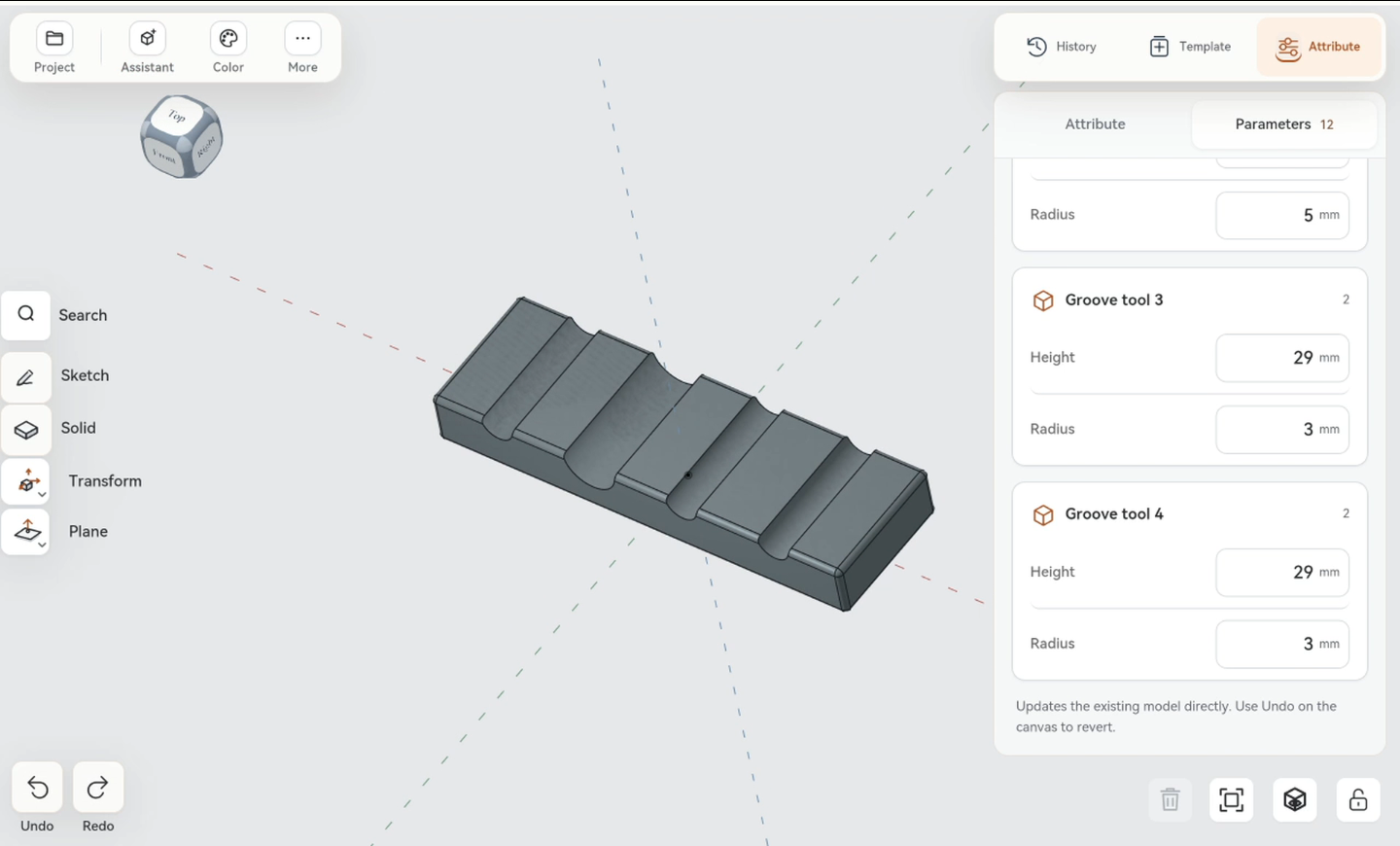
That distinction matters. “Make this groove larger” is useful language while exploring a design. Once you know the radius you want, a numeric control is a more direct way to express it. The highlighted geometry helps connect the value in the panel to the feature you are changing.
Why editability matters more than the first render
A cable organizer is a small example of a larger CAD requirement: the first result is rarely the last decision.
You may like the overall design and still need to change one dimension. Starting again introduces work you have already done. Keeping the model editable lets you focus on the remaining difference.
Here, language and direct editing serve different roles. The sentence describes the object and gets the design underway. The radius control handles a specific adjustment once the geometry is visible. Neither interaction has to do everything.
This is the practical value of continuing to work on the same model: AI generation becomes the beginning of a CAD workflow, not the point where your control ends.
What the tablet adds to the workflow
The tablet is useful because the model and its controls remain together. You can inspect the organizer, select a groove, change its radius, and look at the revised shape in the same workspace.
For a maker working beside a desk or printer, that can make a small design revision easier to tackle where the problem is visible. You do not need to treat mobile CAD only as a way to view a file prepared elsewhere.
A larger screen may still be preferable for complex parts or detailed inspection. The point of this demo is narrower and more practical: a tablet can be a place to generate a part and make a specific dimensional change to it.
Explore Nora3D’s mobile CAD workflow for more on choosing where to start and where to refine.
Check the fit before printing
A radius value is a design choice, not proof that a cable will fit the finished print. Measure the actual cable and consider how much clearance or retention you need. After widening a channel, check the material remaining around it and review the exported model in your slicer.
A small test print can help resolve fit before you commit to the complete organizer. The video demonstrates modeling and editing; it does not show a physical fit test.
Start with words and keep control of the model
The strongest moment in this demo is not the first appearance of the organizer. It is the change afterward: one groove gets a different radius, and the design continues from there.
That is the standard worth applying to AI CAD on a tablet. Can you get a useful starting point from a sentence—and still make the precise change that matters next?
With this cable organizer, the answer is visible in the model.
Try Nora3D or learn more about text-to-CAD with editable geometry.