I am building an AI CAD tool. Today, my most important design decision was a 90-degree bend. My second was tea.
The bathtub model was already there. It had a basin, a faucet, and handles. What it needed next was a drain. I wanted to describe that change to Nora, rather than work out which CAD commands to use and in what order.
That is what I mean by vibe CAD: explain what should change, answer the questions that matter, and let the AI assistant carry out the modeling steps on the existing design.
Nora handled the CAD. I handled the tea.
Start with the model you already have
Many AI design demos begin with an empty canvas. This one begins with a bathtub that already has its own shape and details.
The first request in the recording is:
Add a drainage hole to the existing model and apply an attractive, harmonious color scheme
The gray tub becomes seafoam green, with a muted brass-colored faucet and light-colored handles. A drain opening appears in the basin floor.
The recording also shows a modeling-command failure notice followed by further checking and a completion message. This is a working example, including an imperfect step along the way, rather than a promise that every request succeeds on the first attempt.
What matters next is that the conversation continues on the same model. There is no need to describe the entire bathtub again just to add the next part.
Ask for a drainpipe and clarify the design
My next instruction is:
Add a drain pipe fitting to the existing bathtub model.
Nora asks whether the fitting should be a straight outlet or a 90-degree elbow. It also asks about the outlet diameter and length, referring to the existing 8 mm drain opening.
I reply:
a 90° elbow. you decide
That short exchange is the part I find most interesting. I am choosing the design direction without manually constructing the fitting. Nora is asking about a decision that changes the geometry, rather than requiring me to name the operation that produces it.
For this demonstration, I let the assistant choose the remaining dimensions. For a part that must connect to something specific, I would supply those dimensions and constraints instead.
Inspect the change in the existing model
The final view shows a brass-colored elbow beneath the tub. The assistant's completion message reports an 8 mm bore, a 12 mm outside diameter, and a 12 mm bend radius.
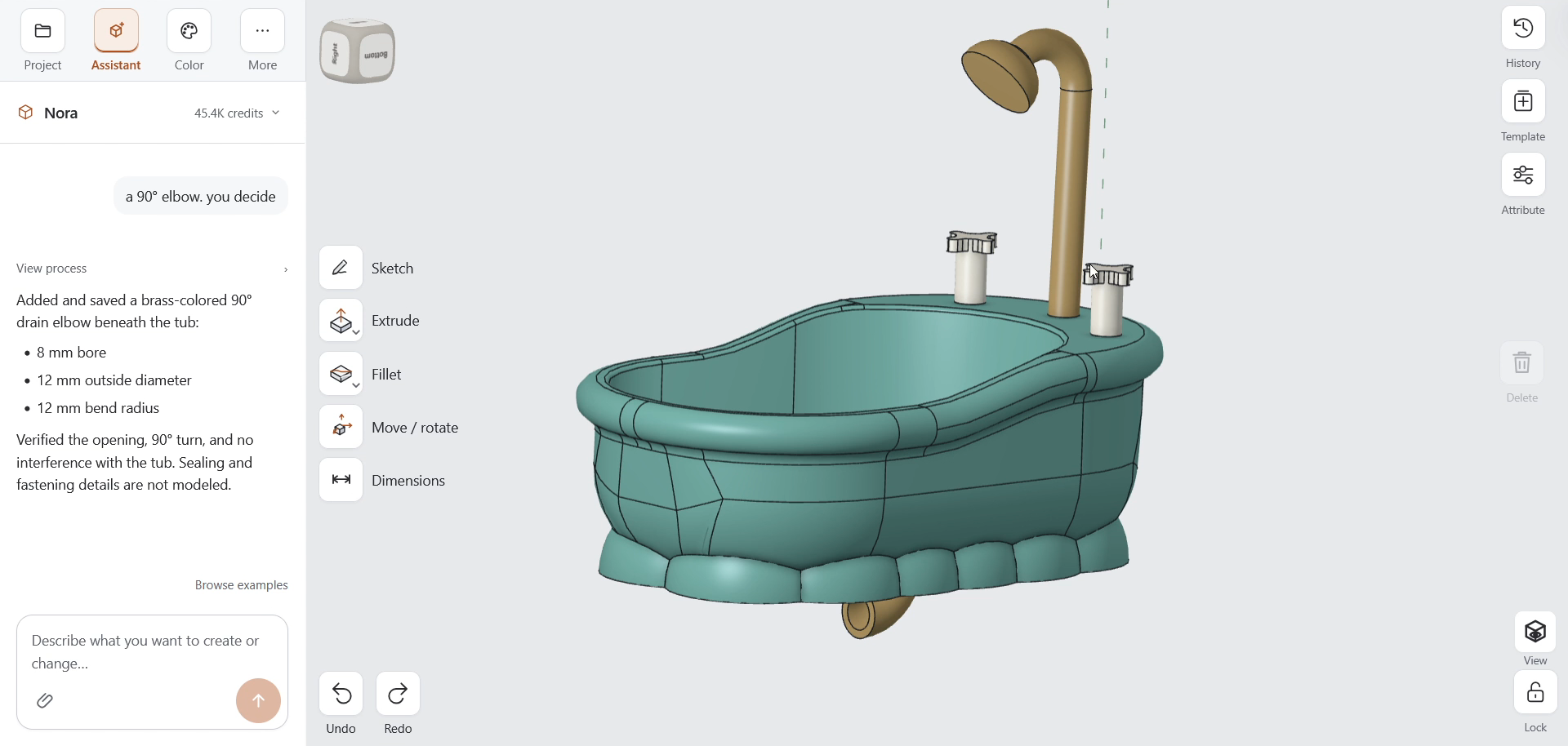
The tub, faucet, and handles remain visible while the new fitting extends the design. That continuity is the point: an AI CAD workflow should help with the next change to an existing object, not only with generating its first version.
This is a CAD modeling demonstration, not a tested plumbing assembly. The assistant explicitly notes that sealing and fastening details are not modeled. A physical version would still need connection details, material choices, and fit and leak testing.
Vibe CAD still needs your design judgment
Vibe coding gave us a useful way to describe working with software through conversation. I want that same ease of interaction when working on a CAD model.
It does not mean requirements disappear. It means the conversation can be about the part: where the outlet goes, what it connects to, and how much space is available. The assistant takes on the modeling steps; the person still decides whether the result solves the problem.
That is the direction I am building Nora3D toward. Open a model, explain what needs to change, clarify the important details, and inspect the result.
Today, that meant giving a bathtub a drainpipe. A modest contribution to civilization, but a useful afternoon for vibe CAD.
Try Nora3D or see another example of editing a tray through conversation.